OCS Admin & Security Team
The systems that protect Open Coding Society as it scales: identity verification and password enforcement across the frontend and both backends, isolated execution for student code, automated database maintenance, and a role-based mentor system.
We secure sign-in, manage mentor access, and keep student code isolated on the Open Coding Society platform.
Package OCS so another school can ship it under its own name.
Sector 2SecurityWhat keeps every kit safe: sign-in and student code.
Sector 3BackendWhat lets a school's staff run it: accounts, mentors, and data.
BeyondVision and team flowWhere we are headed and how we split the work.
OCS in a Kit
Everything that makes OCS ours becomes a setting, so another school can make it theirs.
In review 1
- One data file for Flask. School domains, account types, and policy values live in one file, not in code (Flask #84).
Next 4
- Pages reads the kit. The frontend takes the same school settings from data, not from hard-coded values.
- Spring student-email check. Spring decides who is a student from the kit's domains, not a fixed list.
- New branding. A school ships the platform under its own name and look.
- Go-live checklist. The deployment steps below, written up so a new school can follow them.
What a school changes
Which email addresses count as students and staff.
Which roles exist and how each one is activated.
Rules such as how often accounts are re-verified.
How a release goes live
Run the database migration
Set
GOOGLE_CLIENT_IDDeploy pages, then Flask
Sign up one real student and confirm activation
Security
Every kit ships safe: only verified people get in, and student code never touches the platform.
Shipped 5
In progress 1
- Login cookies. Harrish is working on the cookies that keep a user signed in, so a session stays secure from login to logout.
Next 7
- Simpler password policy. Spring's password-complexity check is causing support issues, so it comes out first.
- Forced password reset. Anyone on a weak or default password must change it at login.
- Yearly re-verification. Students confirm who they are at login once a year.
- Isolated Spring runner. Java gets its own container. The API wiring is in progress.
- Runner hardening. Settings move to
.env, plus resource limits, timeouts, non-root execution, and restricted network and filesystem. - Spring access control. Permissions on every endpoint.
- Audit log. A record of important security events.
How submitted code is run
Student submits code
Spring or Flask receives it
Runs in a separate container
Only the result comes back
How a password reset works
Reset requested
Google and GitHub ID verified
Ticket issued, rate-limited
Password changed
Active tokens invalidated
Backend
Every kit ships runnable: each account has a known state, and staff can see and change it.
Shipped 6
ROLE_MENTOR sits between teacher and admin, with its own view of the site.In review 3
- Guest accounts. Keep them working under the new activation rules.
- Backup restore. Restoring a backup keeps each account's activation state.
- Pending status. A user who is waiting on verification can see their own status.
In progress 1
- Mentor dashboard. We are building a dashboard where each mentor tracks only their own groups' progress and notes, building on the mentor role and verification already shipped. Darshan leads it, with Harrish building alongside.
Next 5
- Account Administration screen. Teachers and admins see all accounts, filter by role and active status, and activate or deactivate. A prototype runs locally. Still open is whether a teacher may deactivate an admin.
- Status column. Shows each account's state with a deactivate action. It waits on the kit's data file.
- Production vs. testing config. Separate Spring settings, so test settings never reach production.
- Spring database migration. Move the Spring data to the new setup, with upgrades applied automatically.
- AI review with mentor design. Mentor-guided review of student work.
How an account becomes active
Person signs up as student or mentor
Student: school Google sign-in activates
Mentor: inactive until staff verify
Active flag and verified date saved
Our vision
An Open Coding Society any school can adopt in its own name, with no account, code, or data left exposed.
Roadmap
| Work | Sector | Status |
|---|---|---|
| OCS as a reusable kit | OCS in a Kit | Flask in review |
| Sign-up, activation, and verification | Backend | Merged |
| Activation follow-ups: guests, backup restore, pending status | Backend | In peer review |
| Mentor dashboard | Backend | In progress |
| Account Administration screen | Backend | Prototype |
| Login workflow: forced reset and yearly re-verification | Security | Not started |
| Observer role and domain or test accounts | Backend | Deferred |
| Deployment | OCS in a Kit | After the PRs land |
How we work
One rep each for security, mentor, and kit work speaks for that area.
Decide the work and keep the board honest.
Each task has one owner, and the least-loaded member claims first.
Review before done, and a weekly update every Thursday.
Our team flow
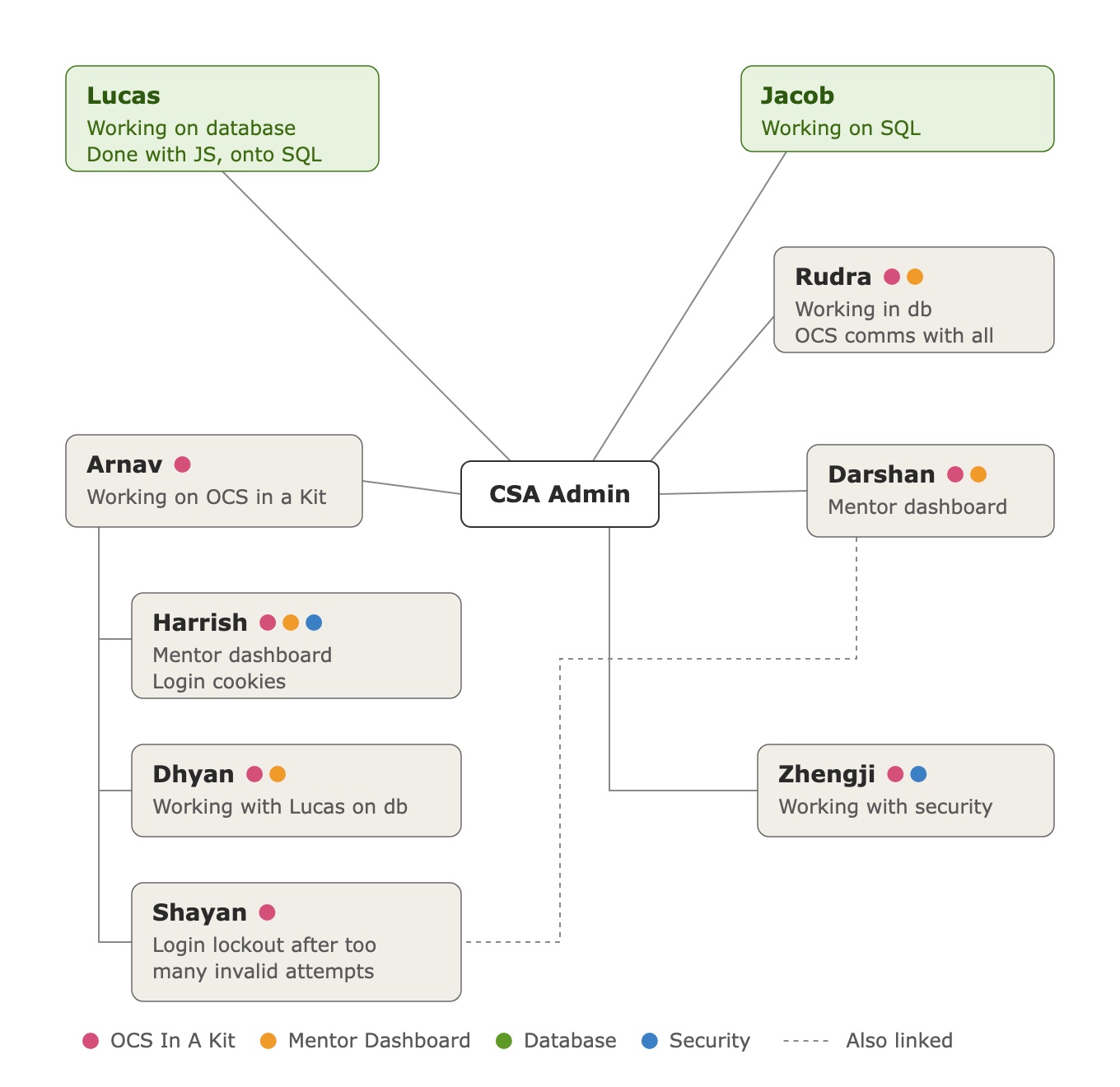
This mindmap shows how we split the work. Everyone branches off the CSA Admin hub, and the colored dots show which workstreams each person is on: OCS in a Kit (pink), Mentor Dashboard (orange), Database (green), and Security (blue).
How the work flows
Arnav works only on the kit, and Harrish, Dhyan, and Shayan report through Arnav. That keeps every branch building toward something another school can set up.
Darshan leads the dashboard and Harrish builds alongside, so mentors can track their own groups. Harrish also works on login cookies, tying the dashboard to secure sign-in.
Zhengji works with security, alongside Harrish's login cookies and Shayan's login lockout, so sign-in stays protected as the kit grows.
Lucas and Jacob (the green boxes) work on SQL. Dhyan pairs with Lucas, and Rudra works in the database while handling OCS communications for the team.
Nearly every member carries the pink dot: whatever they build keeps its school-specific values in the kit. Dashed lines mark work that crosses branches, such as Shayan's login lockout, which ties into the accounts Darshan's dashboard shows.