
Classroom Presence System, Roadmap
What works now, what's next, and what waits until the research data supports it.
From contact tap to contactless presence
What works now, what's next, and what waits until the data supports it.
| Issue | Mentor feedback | Status | Where it is |
|---|---|---|---|
| #10 | Pacemakers and implants: check reader frequencies, cite research, opt-out | Documented | Research page, Medical Device Considerations. To do: datasheet and FCC ID |
| #10 | "Zero" teacher effort is inaccurate | Done | Research question and H3 now say very low effort: the teacher reviews exceptions |
| #10 | Phase 5: district cost research | Planned | Phase 5 card below. Research only, not a build |
| #10 | Yearly time lost to attendance | Done | Overview: about 30 hours a year. To do: measure the 10 minutes |
| #15 | CSSE sprints: Phase 3, then Phase 4 by MVP | Draft | Sprint plan below. Confirm what Phase 3 and 4 mean |
| #15 | Deeper OCS integration | Merged | Presence API merged into OCS (PRs #96, #97); deploy pending. Technical page updated |
| #15 | One story per page, cartoon and real (N@TM) | Planned | For N@TM; not started |
| #15 | Keep the pipeline-page documentation style | Kept | How It Works is the template |
| #15 | Circular enclosure, open only at the tap area | Designing | Tap Reader Build: requirements and test plan |
| #15 | Measure and scale the 3D-printed parts | Planned | Tap Reader Build: measure, test print, then final print |
Mentor feedback tracker: what we heard in the first two reviews, and where each item stands.
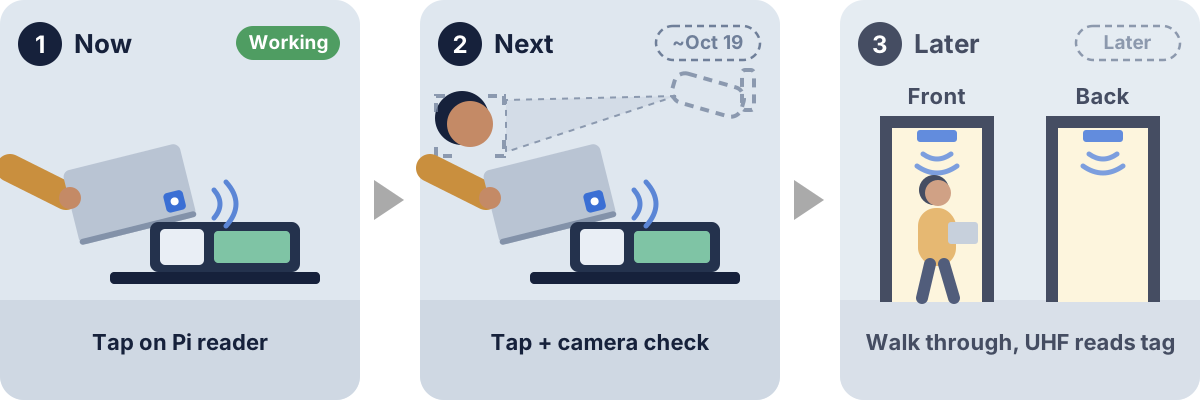
Where it's going: today a tap, next a face check, later no tap at all.
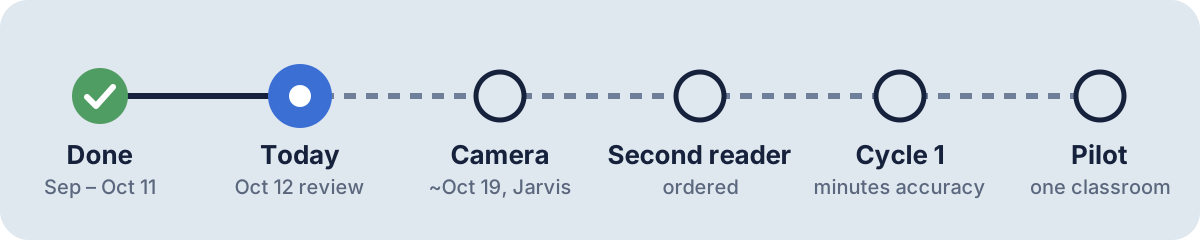
Plan: next up is the camera with the Jarvis team.
| Part | Status | Note |
|---|---|---|
| Tap reader | Working | Raspberry Pi 4 with a Waveshare PN532 NFC HAT, S50 cards |
| Presence API in OCS | Merged | PRs #96 and #97: rooms, schedules in the database, backup/restore |
| Deploy to the OCS server | Pending | With the OCS deploy team |
| Live dashboard | Local | Works on our local OCS; goes live with the Pages PR after deploy |
| Self-registration | Built | Students register their own card; PR after deploy |
| Camera check | Next | Jarvis team; date to be set |
| Enclosure | Designing | Circular, open only at the tap area |
Status today: what works, what's next, and what's ordered.
| Stage | What it was |
|---|---|
| Classroom pilot | Hardening the tap system for a real class period: a deck of RFID-stickered playing cards (one per student), a production backend and admin dashboard, real auth, off SQLite. |
| UHF doorway transition | Swap the tap pad for contactless UHF reads at a single door-table rig, tags mounted on laptops instead of tapped, and the start of a Camera Events contract with the face-scanning system. |
| Full room-scale presence | Front and back door UHF detection, full RFID and camera correlation, the complete presence-state machine (present, tardy, stepped out, left early, opted out, tamper) running live in the trial room. |
Later stages. These were paused until the research data supported them; after the 10/12 review the direction is to move into Phase 3 and reach Phase 4 by MVP (sprint plan below).
| Sprint | Goal | Phase | Demo at the end | Owner |
|---|---|---|---|---|
| 1 (done, Oct 5–20) | OCS integration: presence API merged into OCS, generic rooms, schedules in the database, backup/restore, Pi 4 PN532 reader, S50 cards | 2 (classroom pilot) started | Tap a card, OCS dashboard shows Present in about 2 seconds | Vibha |
| 2 (next) | Deployed pilot: OCS deploy, dashboard and self-registration on Pages, production room and cards, enclosure v1 test print, camera connection with Jarvis | 2 (classroom pilot) done | A real class period tracked on deployed OCS; students register their own cards | assign |
| 3 | Doorway reader and research Cycle 1: reader at the door for enter and exit, minutes compared with a hand log (H2), camera face check on taps | 3 | Minutes report for one class next to the hand log | assign |
| 4 (MVP) | Room-scale presence: RFID and camera correlated, presence states live, teacher reviews exceptions only (H3 measured) | 4 | One class period run end to end, teacher effort timed | assign |
CSSE sprint plan (draft): each sprint has a goal, a phase, and a demo. Dates and owners to set; confirm with the mentor what Phase 3 and Phase 4 mean (the hardware stages above, or a renumbered plan).
Phase 5: district deployment feasibility (research, not a build)
From the first peer review (#10): what would it cost PUSD to run this for every classroom once Phase 4 works?
- Hosting: cloud, district servers, or a hybrid (processing on each Pi, central storage).
- Hardware per classroom at scale: readers, cameras, Pis, cards per student, and bulk pricing.
- Running costs: replacement cards, failed hardware, IT staff time, monitoring and updates.
- Privacy and compliance: FERPA and California student data law (encryption, audits, retention limits).
- Compare the yearly cost with the instructional time recovered (about 30 hours per class per year, see the Overview).
Back-of-envelope, with placeholder numbers: about 20 events per student per day × 35,000 students × 180 days ≈ 126 million events a year; at about 200 bytes each that is roughly 25 GB, which is small. The real costs are likely hardware, camera processing, and staff time, not storage. Replace the placeholders with PUSD enrollment and measurements from our own logs.
Talking points and details
How the build is staged
The hardest part of this project, antennas that reliably detect presence without a tap, is deliberately last. The build is staged so each phase produces something usable and testable on its own.
Phase 1 reflects the current working prototype. This is a hardware rollout roadmap, a different axis from the research cycles in the Research Proposal. See Research for how the project's framing itself changed.
Plan, with dates
- Sep First RFID tap reaches OCS
- Oct 5 Shared presence API, bell schedule, live dashboard
- Oct 6 Camera endpoints ready on our side
- Oct 11 Live demo working
- Oct 16 Camera connection test (Jarvis)
- ~Oct 19 Camera face check on every tap
- TBD Second tap reader (ordered)
- TBD Cycle 1: minutes within 2 min of a hand log (H2)
- TBD Classroom pilot
Later, If Data Supports It
The Research Proposal explicitly pauses this hardware work until the research cycles show which input is actually worth deepening: "None of it answers a research question until data shows RFID is the right input." Kept here as a condensed record of the plan, not an active workstream.
Hardware phases
%%{init: { "flowchart": { "htmlLabels": false, "diagramPadding": 16 } } }%%
flowchart LR
    	P1["Phase 1
    Contact-Tap Prototype
    current"] -.next: see the sprint plan.-> LATER["Later, if data
    supports it:
    UHF, room-scale"]
Phase 1: goal
Prove the core read, log, and dashboard loop end to end, cheaply, before investing in UHF hardware or camera integration.
Phase 1: how it works today
%%{init: { "flowchart": { "htmlLabels": false, "diagramPadding": 16 } } }%%
flowchart LR
        S["Student taps
    their card"] --> R["RFID scan pad
    13.56MHz MIFARE"]
        R --> F["Flask backend
    logs UID + timestamp"]
        F --> DB[(SQLite)]
        DB --> D["Dashboard
    shows scan events"]
Phase 1: what's running
- Reader: RFID reader board, one scan pad
- Tags: 13.56MHz MIFARE Classic, 10 demo tags
- Backend: Flask dev server
- Database: SQLite
- Frontend: rough scan-event dashboard
Phase 1: acceptance criteria
- RFID reader board with one scan pad, 13.56MHz MIFARE Classic tags, 10 demo tags
- Basic Flask backend logging reads to SQLite
- Rough dashboard showing scan events
Funding
Funding, the pilot equipment in the room, and the funding proposal spreadsheet now have their own tab: Funding.