
OCS GameEngine Guide
Applying Object-Based Game Mechanics
This module introduces the OCS GameEngine and its core mechanics using GameBuilder. Learners explore key objects—Backgrounds, Players, NPCs, and Barriers—while developing foundational understanding of object properties, interactions, and system behavior. This transition from semantic/syntax lessons to applied object-based mechanics prepares students to design and implement their own interactive games within the GameEngine environment.
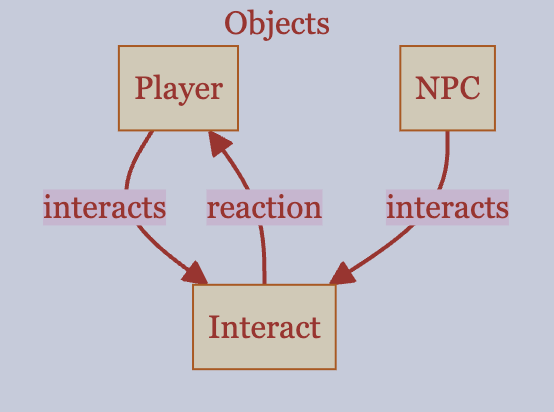
GameEngine Briefing
- Game Objects
- Game Loop
- Properties and Updates
- Interactions and Reactions
Engine Architecture and Mechanics
The GameEngine is where students apply object-based mechanics in a larger system. This guide introduces the core architecture of the GameEngine, including the game loop, object lifecycle, interactions, and reaction behaviors. It provides a system-level overview of how objects update, respond, and interact within the engine runtime environment.
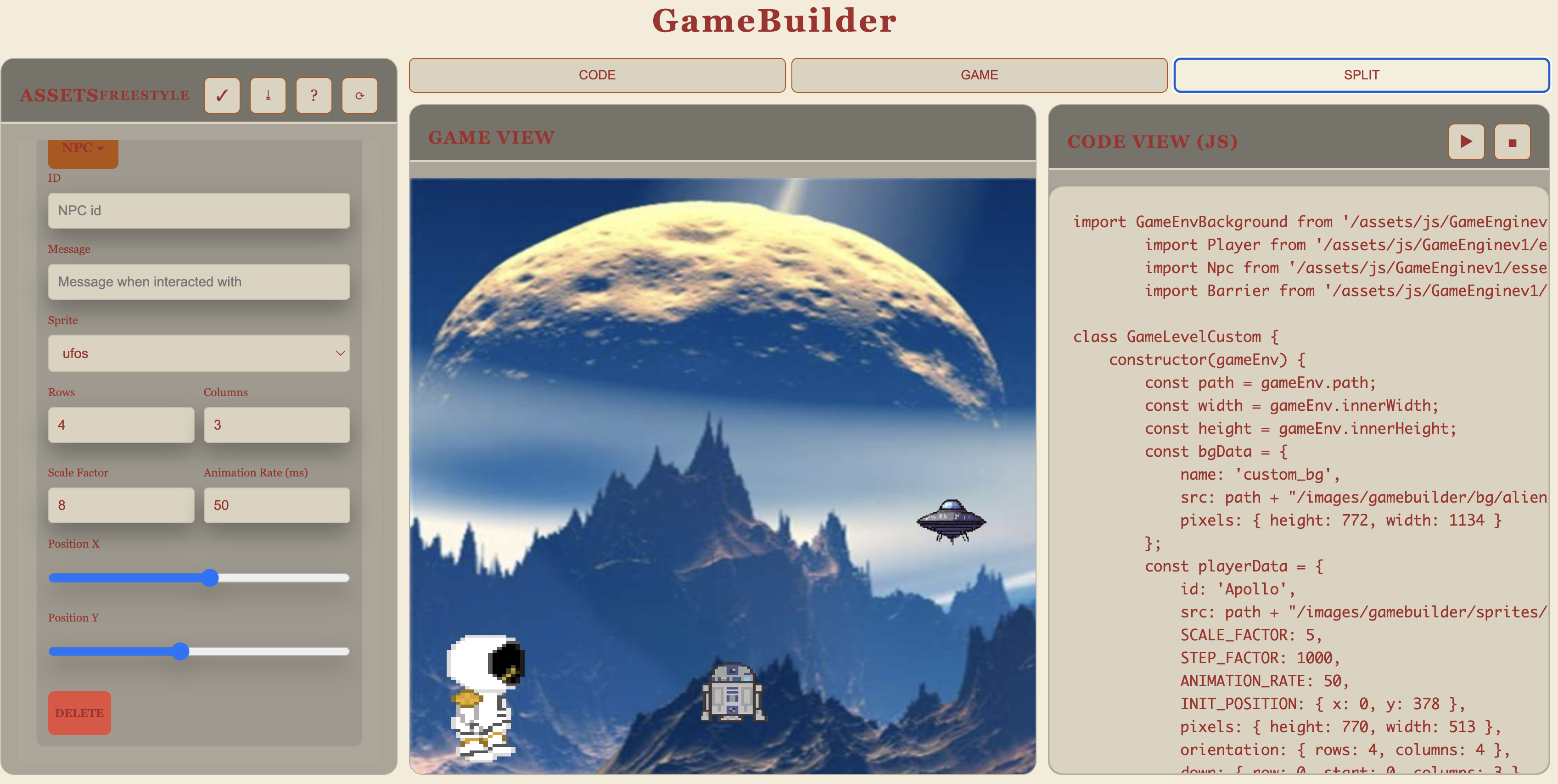
GameBuilder Visual Interface
- Visual Design
- Backgrounds and Characters
- Objects and Interactions
- Properties and Tuning
Interactive Game Creation Tool
GameBuilder is the interactive environment that reduces cognitive load when implementing object-based mechanics. GameBuilder provides a visual interface for configuring game assets and object properties. Learners select assets, generate structured game code, incrementally refine mechanics, and test the game in real time to observe system behavior—all without manual syntax coding.
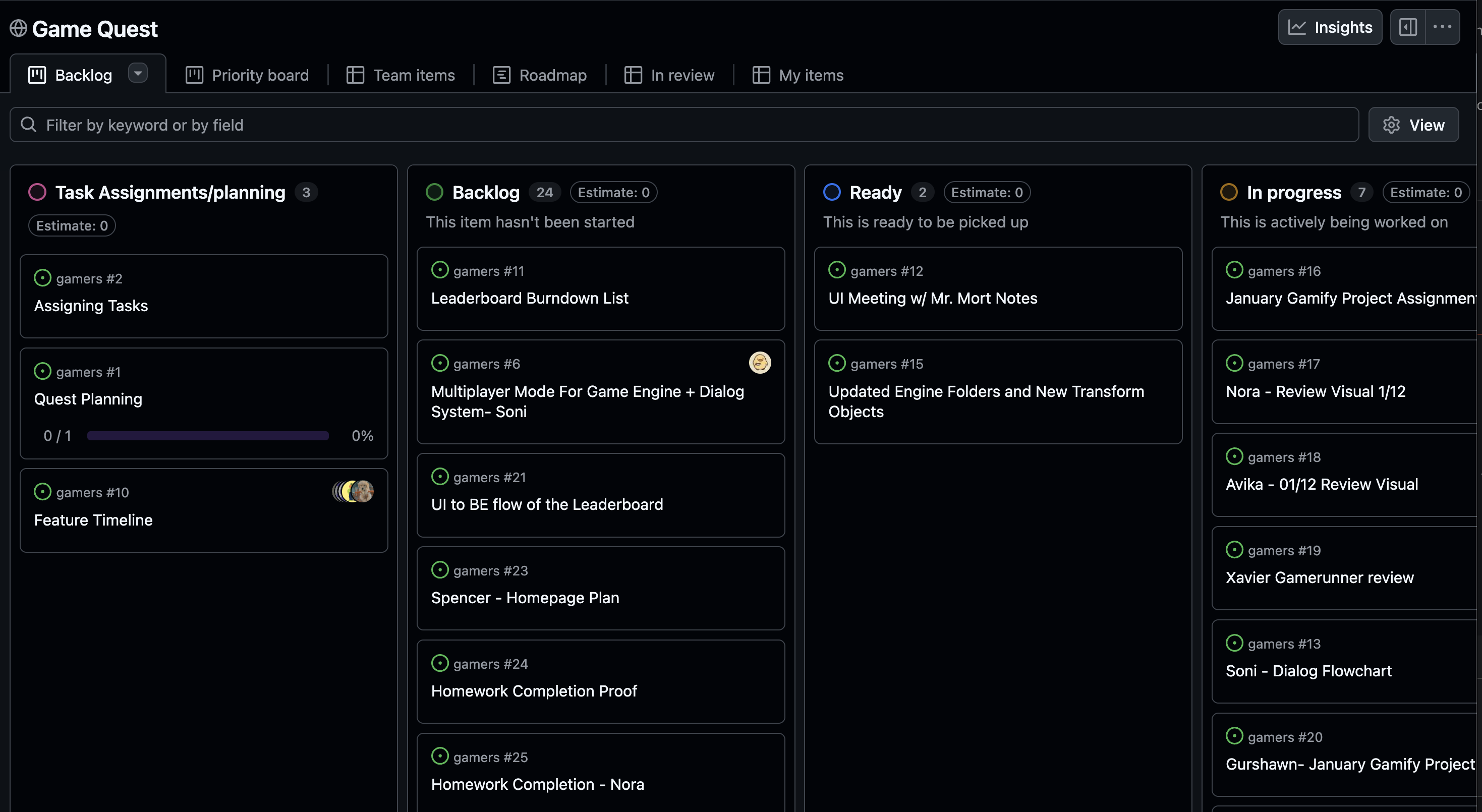
Logistics and Submission Guide
- Team Repository and Files
- Issue Tracking and Kanban
- Individual and Team Commits
- Instructor Fork Repository
- Selective Pull Requests
Structured Development and Assessment Workflow
GitHub serves as the instructional management and assessment tracking tool. Students develop their game within a shared team repository used throughout the 12-week course. Daily commits, feature development, and asset updates occur within their primary team repository. Selective Pull Requests are submitted to an instructor's fork repository to support structured, instructor-directed integration and assessment of GameBuilder files and assets.
Applying Object-Based Game Mechanics
This mini-sprint requires 3 Formative Assessments (individual progress checks) followed by 1 Summative Assessment (team integration). The remainder of the sprint is focused on project-based learning.
Assessment Structure:
- Formative 1: Configure foundational objects
- Formative 2: Implement interactions
- Formative 3: Manage assets and files
- Summative: Integrate team work and demonstrate mastery
2-hour Mini-Sprint (Team, Group, & Individual)
This module requires learners to apply object-based programming concepts using the OCS GameEngine and GameBuilder. Students configure core game objects, define interactions, document implementation decisions, and demonstrate structured version control practices.
Estimated Technical Time: 2 Hours
Students: Primarily 9th to 10th grade students with 12 weeks of instructional experience.
Formative Assessment 1 – Mini Game Configuration (Individual)
Objective: Configure foundational game objects and document implementation decisions.
Instructions
- Use GameBuilder to create a mini game that includes:
- One Background
- One Player
- One NPC
- At least one Barrier
-
In the shared team repository, create a GitHub Issue titled:
S4 [Your Name] - Mini Game [Your Level Name] - In the Issue, include:
- A brief description of your game concept
- A list of configured objects and their roles
- Key configuration decisions (properties, positioning, behavior)
-
Export the generated JavaScript configuration file.
- Commit the file to the shared team repository.
- Each team member is creating their own level
- Each level will be named uniquely to co-exist in GameBuilder directory
- Add structured documentation comments (Javadoc-style) explaining:
- The purpose of each object
- Key property selections
- Paste the commit link into the GitHub Issue.
Submission Requirements (FA1)
- Complete GitHub Issue
- Committed JavaScript configuration file
- Documented object-level explanations
- Commit link referenced in the Issue
Formative Assessment 2 – Interaction and Behavior Design (Individual)
Objective: Implement and document object interactions within the game loop.
Instructions
- Modify your mini game to include:
- One defined interaction (e.g., collision, scoring, trigger event)
- One observable reaction (e.g., score update, animation, state change)
-
Create a new GitHub Issue titled:
S4 [Your Name] – Interaction DesignInclude:
- A description of the interaction logic
- An explanation of how the reaction is triggered
-
Commit updated configuration or script files.
- Add documentation comments explaining:
- Where the interaction occurs in the game loop
- How object properties update during execution
- Reference the new commit in the Issue.
Submission Requirements (FA2)
- Updated GitHub Issue with interaction explanation
- Committed updated configuration/script files
- Documented interaction logic
- Commit link added to Issue
Formative Assessment 3 – Asset and Configuration Management (Individual)
Objective: Demonstrate correct file structure and asset integration practices.
Instructions
- Add at least one new asset (image or object variation) to your game.
- Ensure:
- Files are placed in the correct directory structure
- References in configuration files are accurate
-
Create a new GitHub Issue titled:
S4 [Your Name] – Asset ManagementDocument:
- The asset added
- File path and directory placement
- Any configuration updates required
-
Commit changes with a clear commit message.
- Reference the commit in the Issue.
Submission Requirements
- Correctly structured asset files
- Updated configuration references
- Documented file placement explanation
- Commit link included in Issue
Summative Assessment – Engine Application Review (Team, Individual)
This is the capstone assessment integrating all Formative work.
Objective: Demonstrate integrated understanding of object configuration, interaction logic, and structured workflow practices.
Estimated Logistical/Integration Time: 2 Hours
Requirements
This summative builds on your three Formative Assessments:
- FA1 objects (Background, Player, NPC, Barrier) → now integrated as team levels
- FA2 interactions → now demonstrated in video walkthrough
- FA3 asset management → now contributing best assets via PR
Team/Students must submit a finalized mini game that includes:
- Integration of student levels into a single game
- Configured core objects in levels
- At least one functional interaction and reaction
- Proper directory structure and asset management
- Structured documentation within configuration files
- Complete and organized GitHub repository, Kanban/Issue history
- Team/Individual summaries of work
- Individual Issue updates for each Formative task
-
Create a Team GitHub Issue titled:
S4 Mini Game [Team Name] – Object-Based Game MechanicsInclude:
- Game concept description
- Link to runtime
- List of all individuals with links to their Formative Issues
Individual Documentation & Reflection
Each student must submit:
- 150-word Narrative Reflection (in a personal Formative Issue)
- Describe your learning experience building your level and mini-game
- Explain how you applied object-based mechanics (Background, Player, NPC, Barrier)
- Reflect on challenges faced and how you solved them
- Connect your work to systems thinking (how objects interact within the game loop)
- Video Demonstration (<1 minute)
- Record a short walkthrough of your game level
- Narrate key features and interactions you implemented
- Upload to personal Google Drive or YouTube (unlisted/public)
- Add video link to your Formative Issue
Team Pull Request Contribution
Each team must submit one Pull Request to the OCS GameBuilder assets repository:
- 1 Best Background from your team’s collection
- 1 Best Player/NPC sprite from your team’s collection
- PR title:
S4 [Team Name] - Asset Contribution - PR description should explain why these assets represent quality work
This contribution enriches the shared GameBuilder asset library for future students.
Review Criteria (Summative)
Evaluation will assess:
- Clear Kanban/Issue history with complete Formative task documentation
- Team repository code history with individual analytics
- Accurate GitHub file organization and structure
- Team game with individual student levels running successfully
- Complete and configured core objects in each level
- Individual narrative reflections demonstrating understanding of object-based mechanics
- Video demonstrations showing mastery of GameBuilder and game interactions
- Team PR contribution meeting asset quality standards
This summative assessment demonstrates your ability to apply object-based programming concepts within a larger system while maintaining professional development practices.
20-hour Project Hacks (Team, Group, & Individual)
Prerequisite: Completion of Mini-Game above.
Scrummer should lead activity, except where noted.
This is a project kickoff. The first assessment of the Sprint will be focused on Ideation, GameBuilder, and Individual Analytics. Review the following items, they are all important as you start a new project.
Form Your Team
- Teams will be created using personas to ensure diverse skills and perspectives.
- Split up roles into Designer (artist/story), Technologist (mechanics), and Scrummer (fundamentals, test, PR)
- Start a Formative Issue, discuss personas and roles
Pick a Game
- Choose from the game options to serve as your project foundation.
- Set up shared repository that best suits your objectives
- Continue on Formative Issue, add game selection and repository link
Ideate on Game’s Purpose
- Designer should lead this activity.
- Carefully read through the sprint requirements, explore GameBuilder, review previous projects, generate your own ideas, and conceptualize your game’s purpose.
- Continue on Formative Issue, capture picture of brainstorm session, create ideation summary and key references that helped inspire your decisions.
Create Issues and Kanban
- Using your game’s purpose and ideation, create team and small group issues to capture requirements and assign tasks.
- Begin working in pairs or small groups to brainstorm, ideate, learn, or extend game levels. Review lessons or create tech talks for future guidance and inspiration.
- Continue on Formative Issue. Use Kanban to highlight current priority issue(s).
Plan Your UI and Assets
- Designer should lead this activity.
- Use GameBuilder to design your user interface, assets, and initial levels or extensions to your game.
- Be prepared to demonstrate GameBuilder with assets you have created (at least 2 levels).
Start Coding
- Begin working in pairs or small groups to add or extend game levels. Create and attend tech talks for guidance and inspiration.
- Add analytics summary directly to a priority Issue. Multiple analytics reports on a shared issue are acceptable.
Submit Assignment
Need to update a submission later? Open the submissions dashboard.